


The Ultimate Mailchimp Tutorial for Beginners
- Corey Larson

- Apr 6
- 8 min read
How to Use Mailchimp: The Beginner's Starting Point
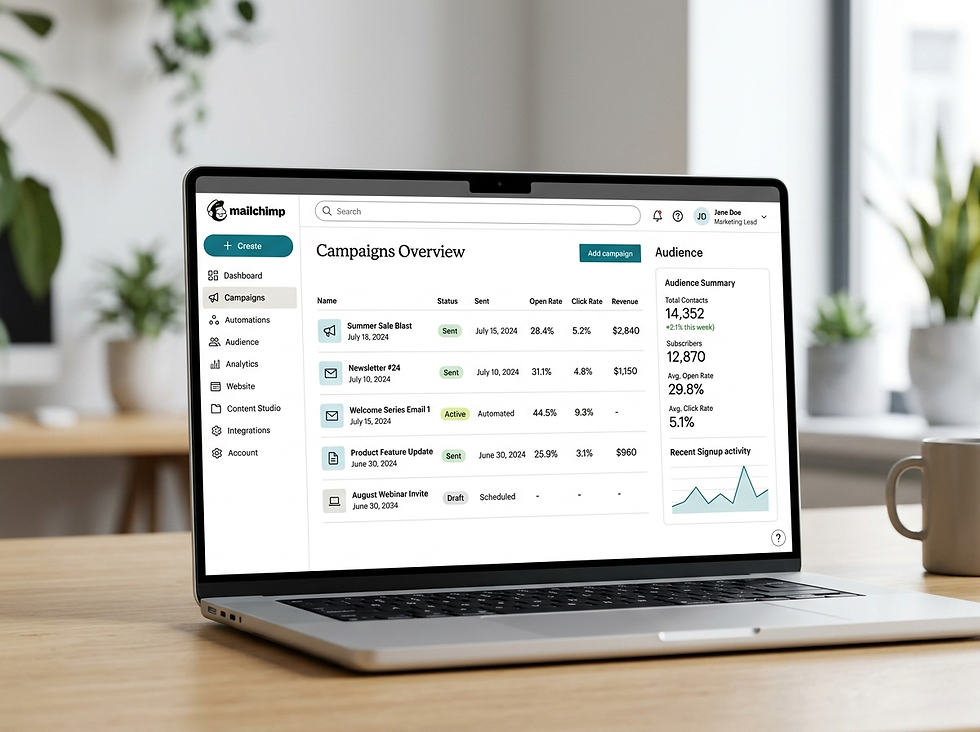
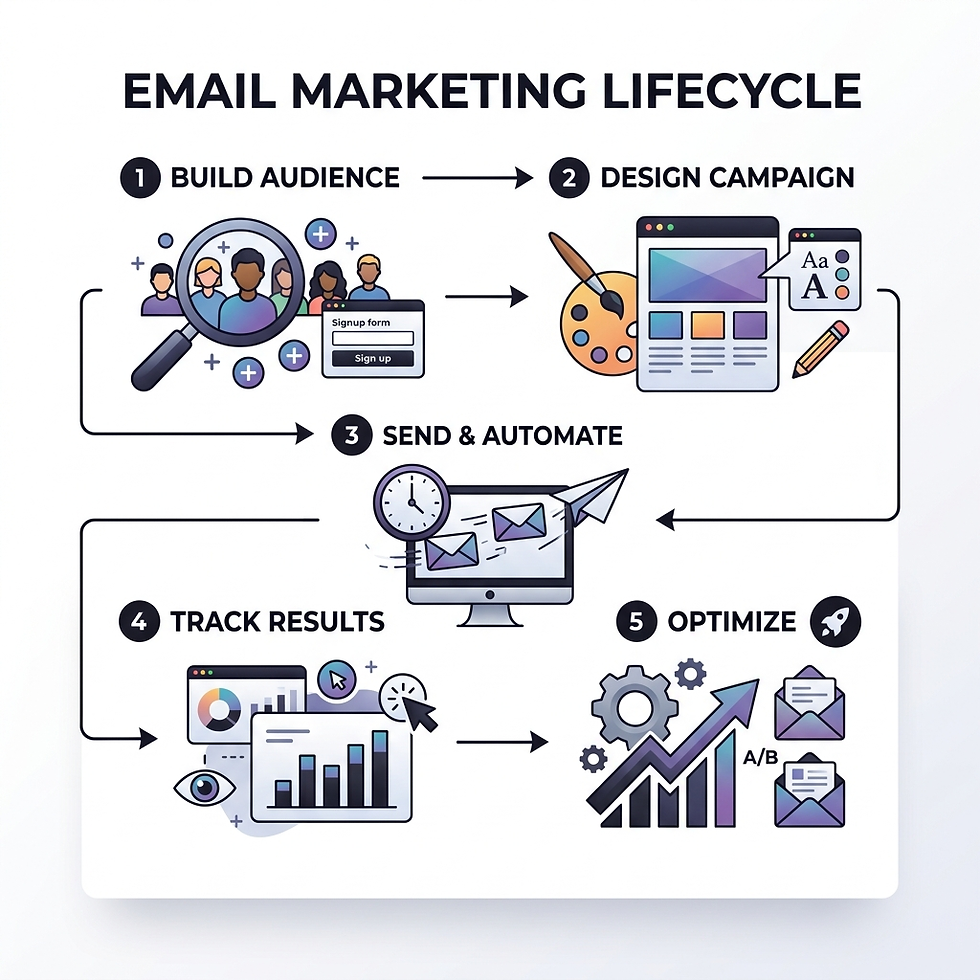
How to use Mailchimp comes down to five core steps:
Create a free account at mailchimp.com and activate it via email
Build your audience by importing contacts or setting up a signup form
Create a campaign by choosing a template, writing your content, and selecting recipients
Send or schedule your email with optimized timing
Review your reports to track opens, clicks, and conversions
Email marketing is one of the most cost-effective tools a law firm can use. Yet most firms either ignore it completely or set it up wrong and wonder why nobody opens their emails.
Mailchimp is the world's most widely used email marketing platform — and for good reason. It has been helping businesses grow for over 24 years, holds a 4.5-star rating across more than 24,900 reviews, and delivers a staggering 99.99% transactional email delivery rate. Its AI-powered tools have already been used to send over 9.8 billion emails, making it far more than just a basic newsletter tool.
For law firms specifically, the stakes are high. You need emails that land in inboxes, speak to the right people, and turn prospects into clients. Mailchimp's automation, segmentation, and analytics tools are built exactly for that kind of targeted, measurable marketing.
I'm Corey Larson, and I've spent years helping legal professionals cut through the noise with high-impact content and marketing systems — including email platforms like Mailchimp. In this guide, I'll walk you through exactly how to use Mailchimp from setup to your first campaign, so you can start building a list that actually drives cases.
Getting Started: Account Setup and Pricing Plans
Setting up your account is the first hurdle in learning how to use Mailchimp. To begin, visit the Mailchimp registration page and enter your business email and a secure password. You will receive an activation email shortly after; click the link inside to verify your account. If you don't see it, check your spam folder—it happens to the best of us!
During the onboarding process, Mailchimp will ask for a few details about your business. One critical requirement is a physical mailing address. This isn't Mailchimp being nosey; it is a legal requirement under anti-spam laws (like the CAN-SPAM Act) to include a valid physical address in every commercial email you send. If you work from a home office in Los Angeles or Austin and prefer privacy, a PO box is perfectly acceptable.
If you are feeling a bit overwhelmed, don't worry. New paid plan users often qualify for a 1:1 onboarding consultation to help navigate the initial setup. For more technical hurdles, the Log in Help Center is a goldmine of step-by-step tutorials.
Choosing the Right Plan
Mailchimp offers several tiers tailored to different business stages. For many solo practitioners or small firms, the Free plan is a great place to start, but the real power lies in the paid tiers.
Plan | Best For | Key Benefits |
Free | Beginners | Basic templates and one-click automations. |
Essentials | Growing Lists | 24/7 support and basic A/B testing. |
Standard | Data-Driven Firms | Up to 30x ROI; AI-powered optimizations and enhanced automations. |
Premium | High-Volume Senders | Advanced segmentation and unlimited users. |
We often recommend the Standard plan because it strikes the best balance between cost and performance. Businesses on this plan have seen up to a 30x ROI by leveraging advanced features like the Customer Journey Builder. Plus, if you have a large list, you might be eligible for a 15% discount for 10,000+ contacts. If you want to expand your reach, SMS marketing is also available as an add-on in select regions.
How to Use Mailchimp to Build and Manage Your Audience
Your "Audience" is the heart of your email marketing efforts. In Mailchimp, an audience is more than just a list of names; it’s a database of people who have given you permission to contact them.
A golden rule in learning how to use Mailchimp effectively is to maintain one primary audience. Rather than creating separate lists for "Past Clients," "Current Leads," and "Referral Partners," it is much more efficient to keep them in one place and use internal tools to categorize them. This prevents you from paying for the same contact twice and keeps your data clean.
To get people onto your list, you can Create a Mailchimp Audience and then:
Import Contacts: Upload a CSV file or copy-paste from an Excel sheet.
Signup Forms: Mailchimp auto-generates a signup form for every audience. You can customize this and embed it on your website.
Landing Pages: If you don't have a website yet, you can build a standalone landing page to collect leads for a specific case type.
For law firms, Email marketing for law firms requires strict adherence to privacy. Always enable double opt-in to ensure subscribers definitely want to be there, and use GDPR-compliant fields if you handle international clients.
Organizing Contacts with Tags and Groups
Once your contacts are in the system, you need to know who is who.
Tags are customizable labels you use for internal organization. For example, you might tag someone as "Met at 2024 Gala" or "Personal Injury Lead." Tags are for your eyes only.
Groups are for the subscriber's benefit. On your signup form, you can ask, "Which areas of law are you interested in?" and let them select "Family Law," "Estate Planning," or "Criminal Defense." This allows them to self-select their interests.
Advanced Targeting with Segments
Segments allow you to filter your audience based on specific criteria. Instead of sending an email to everyone, you can create a segment for "People in Austin who haven't opened an email in 3 months." This level of personalized messaging ensures your content remains relevant, which keeps your unsubscribe rates low and your engagement high.
Creating and Designing Your First Email Campaign
Now for the fun part: sending your first email. In Mailchimp, any message you send is called a "Campaign." Before you hit send, you will walk through a structured email checklist. This ensures you’ve covered the "To" (recipients), "From" (your firm name and email), "Subject," and "Content."
For subject lines, keep them under 60 characters to ensure they don't get cut off on mobile devices. Don't forget the preview text—that little snippet of text that appears after the subject line in an inbox. It’s prime real estate for a "hook" that encourages the reader to click.
For a deeper dive into strategy, check out our guide on Effective Email Campaigns for Law Firms: A Comprehensive Guide.
How to use Mailchimp for email design
Mailchimp’s drag-and-drop builder makes it easy to create professional layouts without knowing a lick of code.
Content Studio: This is where you store your firm's logos, attorney headshots, and graphics.
Templates: Don’t start from scratch every time. Create a reusable template for your monthly newsletter to maintain brand consistency.
Merge Tags: Use tags like |FNAME| to automatically insert the recipient’s first name. It makes a mass email feel like a personal note. For more tricks, refer to this merge tags cheat sheet from Mailchimp.
Selecting the Right Campaign Type
Not every email should look like a newsletter.
Regular Emails: Your standard formatted HTML emails.
Plain-Text: Sometimes a simple, text-only email feels more personal and authentic, especially coming from an attorney.
RSS Feeds: Automatically send an email whenever you post a new blog to your website.
Transactional Emails: One-to-one messages like appointment confirmations (requires a separate setup).
Advanced Features: Automation, A/B Testing, and Reports
Once you’ve mastered the basics of how to use Mailchimp, it’s time to let the platform do the heavy lifting. Mailchimp is an AI-powered powerhouse. In fact, our customers have sent over 9.8 billion emails using AI-generated content suggestions. By combining email with SMS marketing, some users have seen 97% higher click rates compared to email alone.
Integrations are another key to success. Mailchimp supports over 300+ integrations, including Google Analytics and various legal CRMs. Connecting these tools allows you to track exactly which emails are driving consultations. For more on using technology to your advantage, read about Boosting Email Campaigns with AI: Smarter Content for Smarter Law Firms.
How to use Mailchimp automations for lead nurturing
Automation is the secret to "making money while you sleep." With the Customer Journey Builder, you can map out a path for new leads.
Welcome Sequences: As soon as someone signs up for your "Guide to Texas Divorce," Mailchimp can automatically send a series of three emails over the next week introducing your firm and offering a consultation.
Trigger-Based Workflows: Send an email automatically when a contact is tagged with a specific interest or hits a certain milestone.
Learn more about this in our article From Leads to Clients: Designing a Legal Email Nurture Campaign.
Optimizing Performance with A/B Testing
Stop guessing and start testing. A/B testing allows you to send two versions of an email to a small portion of your list to see which performs better. You can test:
Subject Lines: Does "3 Tips for Your Case" work better than "Legal Update"?
Send Times: Do your clients in Los Angeles open emails more on Tuesday mornings or Thursday afternoons?
Content: Does a button work better than a text link?
Analyzing Campaign Reports
After your campaign goes out, Mailchimp provides detailed analytics.
Open Rates and Click-Through Rates (CTR): See how many people engaged with your message.
Industry Benchmarks: Compare your performance against other legal professionals.
Bounce Management: Mailchimp automatically handles "hard bounces" (invalid emails) to protect your sender reputation.
Frequently Asked Questions about Mailchimp
Is Mailchimp free for beginners?
Yes! Mailchimp offers a "Free" plan that includes all the basic tools you need to start building an audience and sending campaigns. It is a fantastic way to learn the ropes before committing to a monthly subscription. However, keep in mind that the Free plan has limits on the number of contacts and monthly sends, and it includes Mailchimp branding at the bottom of your emails.
How do I avoid the spam folder?
To keep your emails in the inbox, follow these best practices:
Never buy lists: Only send to people who have explicitly opted in.
Authenticate your domain: Verify your firm's domain in Mailchimp settings.
Use a recognizable "From" name: Use your name or your firm's name so people know who you are.
Avoid "spammy" words: Words like "FREE," "URGENT," or excessive exclamation points can trigger filters.
Can I use Mailchimp for SMS marketing?
Absolutely. SMS marketing is a powerful add-on that allows you to send text messages directly to your clients' phones. When used alongside email, it can significantly boost your engagement rates. Just be sure to follow TCPA regulations and obtain proper consent before texting.
Conclusion
Mastering how to use Mailchimp is a journey, not a sprint. By starting with a clean audience, designing professional templates, and leveraging the power of automation, you can transform your law firm's marketing from a manual chore into a "referral engine" that runs on autopilot.
At Outlier Creative Agency, we specialize in helping law firms in Los Angeles and Austin navigate these complex digital waters. Whether you need help with Email Marketing for Law Firms or you want to build a Referral Engine through innovative legal marketing, we are here to help you increase your caseload and scale your practice.
Ready to take your firm to the next level? Let’s start building your first campaign today.


Comments