
Protect your firm with ADA compliance video lawyers to avoid digital lawsuits and meet WCAG 2.1 AA standards for accessible legal content.
Why Is Video Accessibility a Crucial Requirement for Modern Law Firms?
To make accessible videos that satisfy federal regulators and avoid costly litigation, law firms must implement three essential standards: accurate, human-verified synchronized closed captions (minimum 99% accuracy), full-text interactive transcripts beneath each embed, and keyboard-operable media players compatible with screen readers. Adhering to Web Content Accessibility Guidelines (WCAG) 2.1 Level AA not only fulfills Title III requirements under the Americans with Disabilities Act (ADA) but also upholds state bar association advertising rules and legal ethics standards regarding non-misleading, accessible communication for prospective clients across personal injury, estate planning, and corporate litigation.
Federal courts and Department of Justice (DOJ) enforcement actions firmly treat law firm websites as places of public accommodation. When your practice publishes client explainers, attorney profiles, or webinar recordings, those digital assets must provide equal access.
The scope of digital accessibility litigation has expanded dramatically. In 2023 alone, plaintiffs filed 4,605 ADA-related digital accessibility lawsuits in the United States, with over 1,200 complaints directly targeting non-captioned or inaccessible video and multimedia players. Brands and professional practices have paid over $6 million in damages and settlements due to inaccessible video assets.
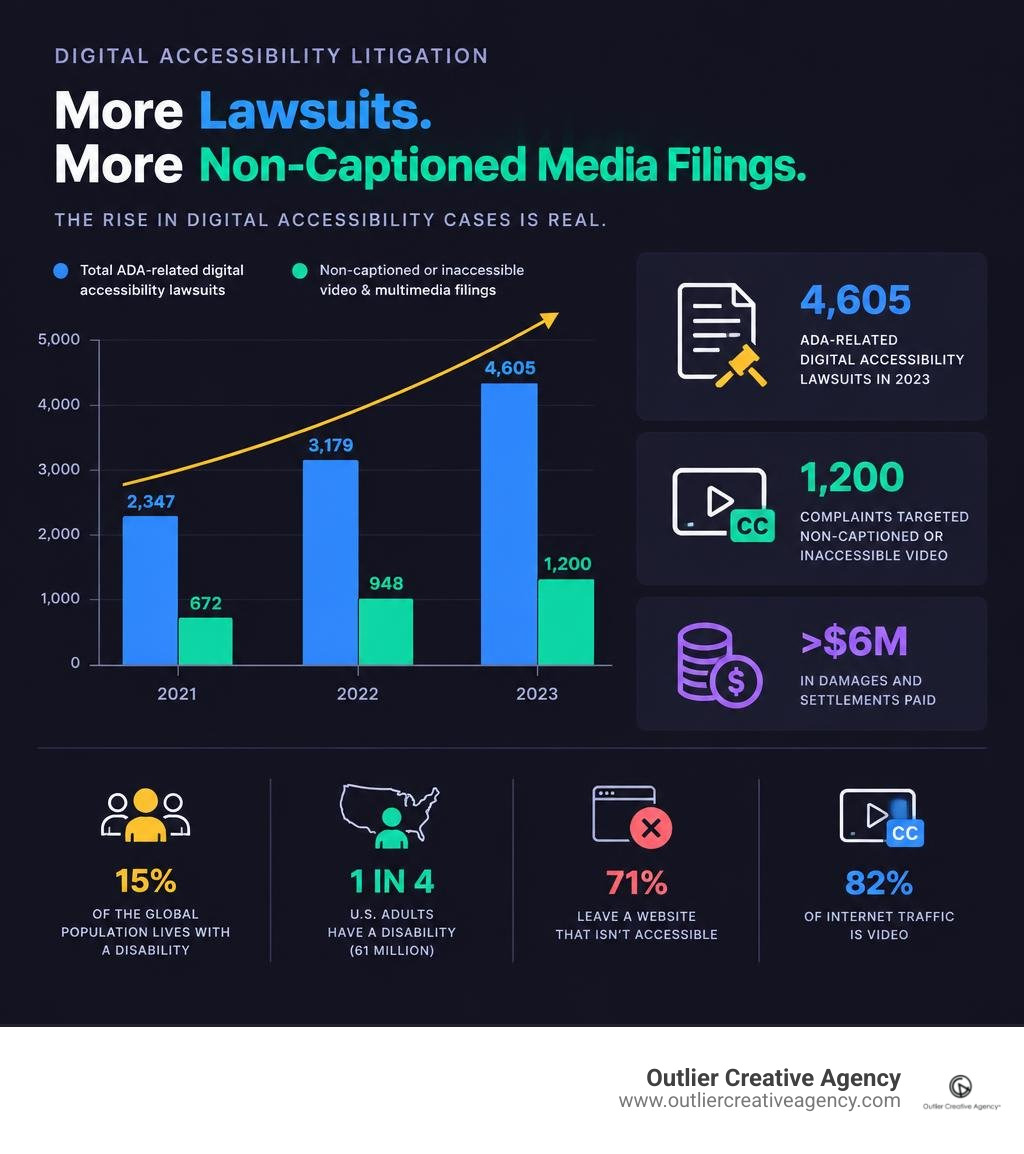
Beyond litigation avoidance, the demographic reality makes accessibility an operational necessity. Approximately 15% of the global population lives with some form of disability, according to the World Health Organization. In the United States, 61 million adults—about 1 in 4—have a disability. Furthermore, 71% of users with disabilities immediately leave a website that fails to provide accessible content. Inaccessible media directly undermines your intake funnel before a prospective client ever contacts your firm.
Video consumption habits have also evolved. Digital video makes up over 82% of all internet traffic. Captions are no longer used exclusively by individuals who are deaf or hard of hearing: 80% of people who turn on closed captions do not have hearing loss, and 85% of social media videos are viewed with the sound turned off. Implementing accessible standards supports overall client conversion, user experience, and search discoverability. For an end-to-end framework on high-impact visual media, explore our comprehensive video production guide for law firms.
How ADA Compliance Video Lawyers Protect Firms from Digital Lawsuits
Defense attorneys specializing in digital accessibility represent law firms and commercial businesses targeted by serial demand letters and federal lawsuits. These actions typically allege violations of Title III due to missing synchronized captions, unannounced visual graphics, or embedded media players that freeze screen readers. Defense practitioners frequently point out that resolving a formal digital complaint through settlement and legal fees costs significantly more than remediating media assets up front.
Proactive legal defense centers on verifiable remediation. Firms operating in major legal markets like Los Angeles and Austin are increasingly aligning their digital assets with both federal standards and state government accessibility mandates. Implementing strict technical standards, maintaining detailed caption logs, and displaying a transparent accessibility statement give defense counsel the objective documentation required to dispute non-compliance claims early.
What Are the Legal Risks and DOJ Title II Enforcement Timelines?
The Department of Justice updated the regulatory landscape through its 2024 Title II digital accessibility rule. While Title II directly governs state and local government entities, its technical mandates reinforce the standards courts apply to private businesses under Title III. The rule establishes formal deadlines: public entities serving 50,000 or more individuals must achieve complete digital accessibility by April 26, 2026, while smaller public entities have until April 26, 2027.
Private law firms representing municipal clients, serving as court-appointed administrators, or managing public legal programs face compounding exposure under these guidelines.
| Compliance Dimension | ADA Title II (Public Entities) | ADA Title III (Private Law Firms & Places of Public Accommodation) |
|---|---|---|
| Statutory Scope | State and local government bodies, public universities, municipal legal departments. | Private law practices, commercial businesses, public-facing digital properties. |
| Technical Standard | Explicitly WCAG 2.1 Level AA across web, mobile, and digital media. | WCAG 2.1 Level AA as the established judicial and regulatory benchmark. |
| Statutory Deadlines | April 26, 2026 (pop. 50k+) / April 26, 2027 (smaller entities). | Ongoing and immediate obligation under "effective communication" principles. |
| Video Requirements | Mandatory synchronized captions, audio descriptions, and accessible players. | Effective auxiliary aids; transcripts, accurate synchronized captions, and keyboard accessibility. |
| Non-Compliance Penalties | Federal administrative actions, loss of public funding, mandatory consent decrees. | Private federal lawsuits, compensatory settlements, mandatory remediation orders, defense legal fees. |
What Standards Govern ADA Compliance Video Lawyers and Digital Media?
Digital accessibility is governed by the Web Content Accessibility Guidelines (WCAG), published by the World Wide Web Consortium (W3C). WCAG is structured around four core principles, commonly referred to as POUR:
- Perceivable: Information and user interface components must be presentable to users in ways they can perceive. Video content must offer text alternatives (captions) and visual alternatives (audio descriptions).
- Operable: User interface components and navigation must be operable via diverse inputs, including keyboard-only navigation without requiring a mouse.
- Understandable: Information and the operation of the user interface must be clear, predictable, and free from confusing interface traps.
- Robust: Content must be robust enough to be interpreted reliably by a wide variety of user agents, including modern assistive technologies like screen readers.
Integrating these principles not only mitigates legal exposure but also structures your media metadata for search crawlers, supporting robust SEO-driven video marketing performance across all major practice areas.
What ADA Compliance Video Lawyers Recommend for WCAG 2.1 AA Standards
When defense attorneys and digital accessibility auditors evaluate multimedia for compliance, they measure assets against specific WCAG 2.1 Level AA success criteria:
- 1.2.1 Audio-only and Video-only (Prerecorded): Provide an alternative text transcript for prerecorded audio-only assets (such as legal podcasts) and audio narration for prerecorded video-only assets.
- 1.2.2 Captions (Prerecorded): Supply accurate, synchronized closed captions for all prerecorded media containing spoken dialogue and meaningful sound effects. Industry standards require a 95% to 99% accuracy threshold.
- 1.2.3 Audio Description or Media Alternative (Prerecorded): Deliver an audio description track or a detailed text transcript that conveys critical on-screen visual information not mentioned in the spoken dialogue.
- 1.2.5 Audio Description (Prerecorded): Under Level AA, law firms must provide synchronized audio descriptions for all prerecorded visual media where dialogue alone does not convey the full context.
- 2.1.1 Keyboard Navigation: Ensure that every video player control—play, pause, volume, scrubbing, full-screen, and caption toggles—is fully operable using only standard keyboard inputs (Tab, Shift+Tab, Enter, Spacebar).
- 2.2.2 Pause, Stop, Hide: Ensure any background video or autoplaying banner that lasts longer than five seconds can be paused or stopped by the user.
Consulting a Title II captioning risk reduction analysis confirms that manual accuracy checks are essential for insulating digital media from claims of regulatory failure.
Which Accessibility Violations Trigger Regulatory Penalties?
Plaintiff firms utilize automated web scanners to identify accessible design failures across thousands of law firm websites simultaneously. Automated tools detect obvious missing tags, but plaintiffs' attorneys follow up with manual inspections to file concrete legal complaints.
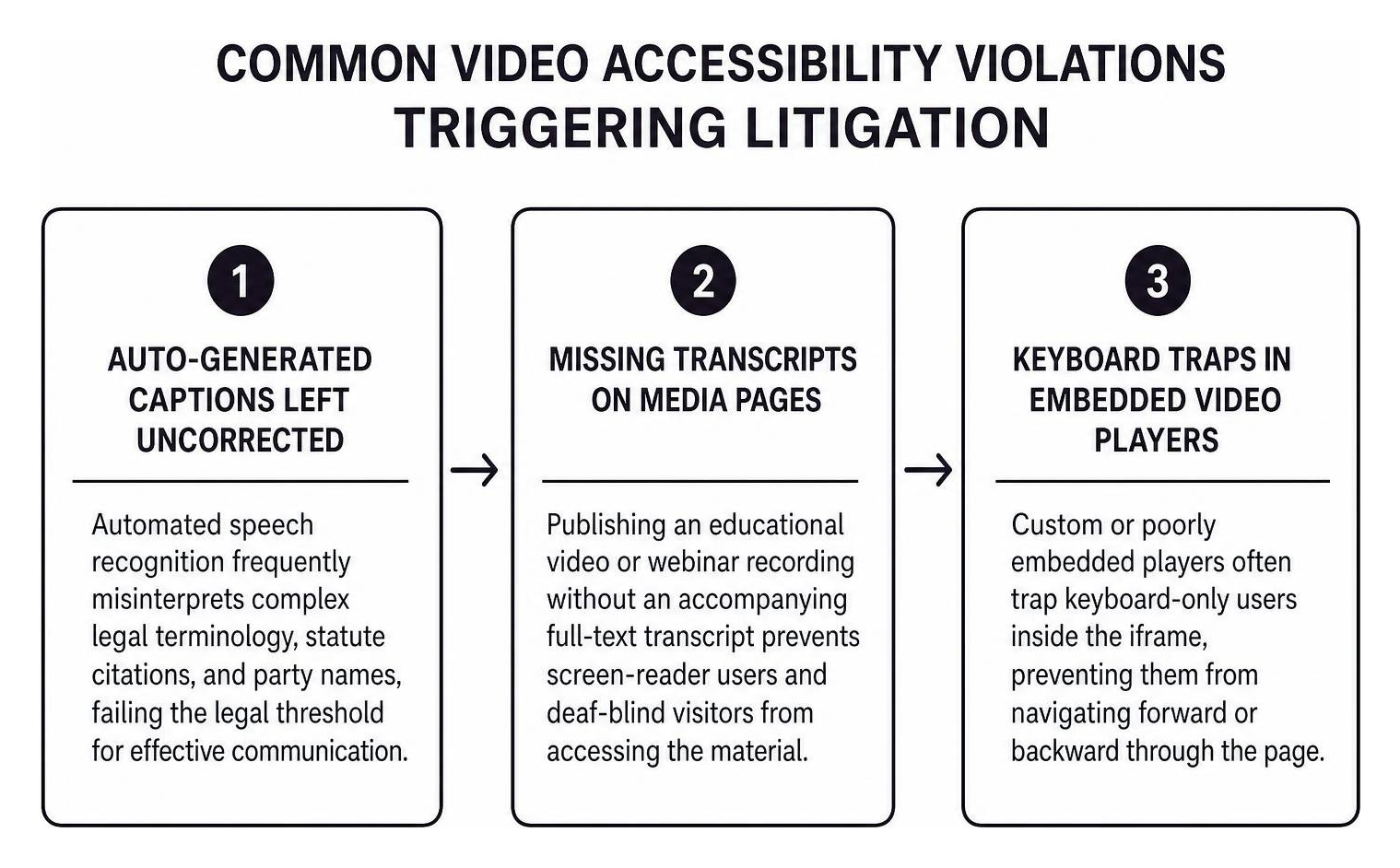
The most litigated video accessibility violations include:
- Auto-Generated Captions Left Uncorrected: Automated speech recognition frequently misinterprets complex legal terminology, statute citations, and party names, failing the legal threshold for effective communication.
- Missing Transcripts on Media Pages: Publishing an educational video or webinar recording without an accompanying full-text transcript prevents screen-reader users and deaf-blind visitors from accessing the material.
- Keyboard Traps in Embedded Video Players: Custom or poorly embedded players often trap keyboard-only users inside the iframe, preventing them from navigating forward or backward through the page.
- Unannounced Visual Text and Charts: Displaying settlement numbers, statutory deadlines, or infographic flowcharts on screen without reading or describing them aloud leaves visually impaired clients without critical information.
- Absence of Flashing Controls (WCAG 2.3.1): Video animations, rapid transitions, or motion graphics that flash more than three times per second pose serious seizure risks and violate strict safety thresholds.
Outside of digital claims, regulatory enforcement across related accessibility mandates remains aggressive. For instance, denying an individual with a service dog access to physical business premises triggers federal fines up to $50,000 per complaint under ADA enforcement protocols, demonstrating the regulatory cost of compliance failures.
How Can Law Firms Create Fully Accessible Video Content?
Building accessible video begins during pre-production, well before the cameras start rolling in the studio. Designing scripts with accessibility in mind reduces the need for expensive secondary audio description tracks later.
During script development, attorneys should naturally speak key visual details. For example, instead of pointing to a graphic and stating, "Look at this timeline," the attorney should state, "As shown in our three-step litigation timeline—filing, discovery, and trial..." This simple habit makes the video naturally accessible to visually impaired listeners without requiring a dedicated descriptive audio track.
Accessible production applies across all client-facing assets, whether your practice is producing firm overviews or high-converting legal lead generation videos.
How to Implement Accurate Captions, Transcripts, and Audio Descriptions
Compliant video delivery requires clean technical execution across your caption, transcript, and visual assets:
- Closed Captions: Provide caption files in standardized formats such as SubRip (.srt) or WebVTT (.vtt). Captions must identify distinct speakers, note meaningful ambient audio (e.g., "[Applause]" or "[Dramatic music]"), and display at a readable pace with sufficient contrast against the video background.
- Interactive Transcripts: Place a complete, readable text transcript directly on the webpage beneath the video player. Interactive transcripts allow visitors to read the full dialogue, search for specific terms, and jump to exact timestamps within the video.
- Audio Descriptions: For complex motion graphics, courtroom recreations, or documentary-style case studies, produce an alternate video version containing a voiceover that describes on-screen actions, text overlays, and setting changes during pauses in dialogue. When producing visual explainers, incorporating custom motion graphics for legal videos that maintain high color contrast and deliberate pacing ensures optimal clarity for all viewers.
How to Choose Compliant Video Players and Accessible Web Controls
Hosting an accessible video inside an inaccessible player still exposes your practice to legal liability. Your firm's web platform must feature a player engineered to support assistive devices.
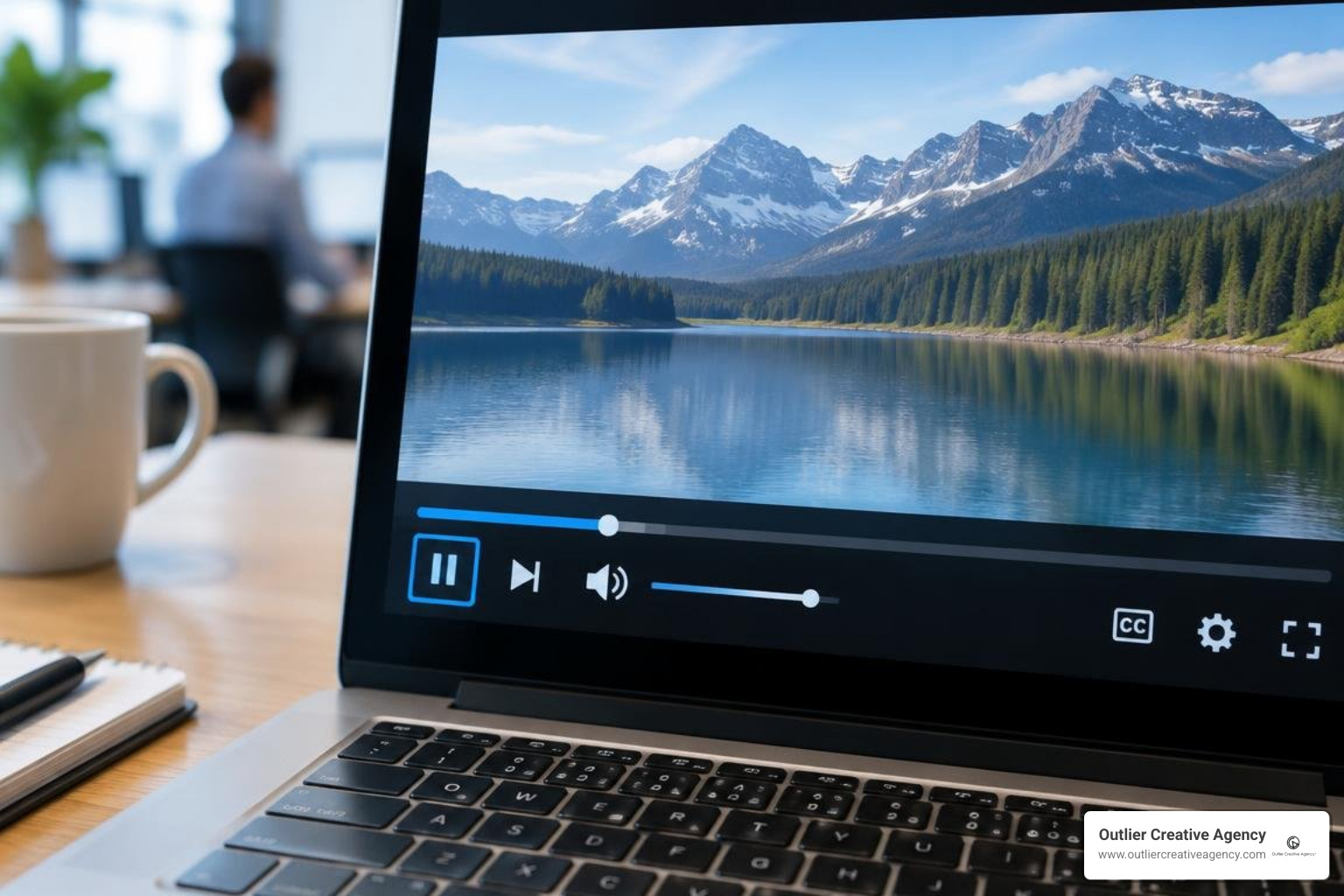
Ensure your video player adheres to these technical standards:
- ARIA Labels: Every player control button (Play, Mute, Full Screen, Captions) must feature descriptive
aria-labeltags so screen readers announce their function accurately. - Keyboard Operability: Users must be able to cycle through controls sequentially using
Taband trigger buttons usingEnterorSpacebar, with a clear visual focus indicator showing which control is active. - Color Contrast: On-screen controls, scrub bars, and closed-caption text overlays must maintain a minimum contrast ratio of 4.5:1 against adjacent background colors.
- Autoplay Suppression: Disable autoplay by default. Video elements should never play audio automatically upon page load, as this drowns out screen-reader speech output for visually impaired users.
If your firm's current website infrastructure cannot support compliant media embeds, upgrading through specialized accessible website design services will eliminate underlying template vulnerabilities.
How Do You Audit and Remediate Existing Legal Video Assets?
Law firms with extensive media libraries must systematically audit legacy content. Relying entirely on automated browser extensions is insufficient: automated tools detect only an estimated 30% of accessibility errors, missing subtle caption synchronization errors, inaccurate legal terminology, and unannounced visual data.
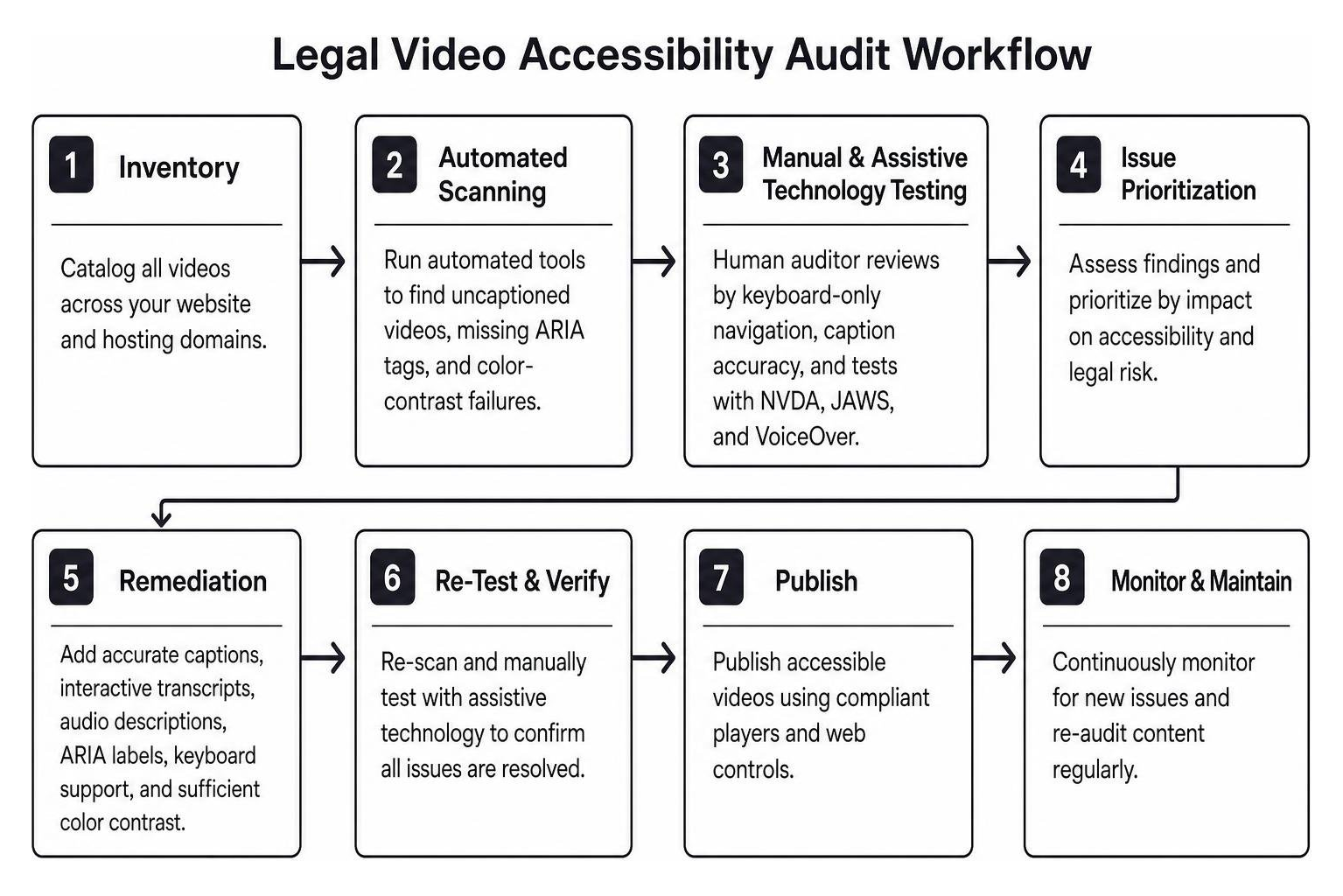
A comprehensive video audit combines two evaluation methods:
- Automated Scanning: Run automated tools across all hosting domains to identify uncaptioned embeds, missing ARIA tags, and color-contrast failures in player skins.
- Manual & Assistive Technology Testing: Have a human auditor navigate your video library using keyboard-only inputs, evaluate caption accuracy against legal terms of art, and test playback using major screen readers such as NVDA, JAWS, and Apple VoiceOver.
When remediation demands exceed your internal team's bandwidth, partnering with an agency experienced in media production for law firms ensures that legacy webinars, practice area overviews, and client testimonials are brought up to full regulatory compliance quickly.
How to Prioritize Legacy Media Audits and Ongoing Monitoring
Remediating hundreds of legacy videos can seem daunting. Law firms should adopt a risk-prioritized triage workflow:
- Tier 1 (Immediate Remediation): Videos embedded on high-traffic conversion pages, including the homepage, primary practice area landing pages, attorney bio pages, and digital intake forms.
- Tier 2 (High Priority): Promotional campaigns, paid social ad videos, YouTube content, and evergreen educational webinars.
- Tier 3 (Scheduled Updates): Archived webinars, older internal training media, and low-traffic historical blog posts.
Establish an ongoing protocol by maintaining a checklist for every new video asset published:
- Video file verified for human-reviewed captions (minimum 99% accuracy on legal terms).
- Speaker identification and ambient sound cues formatted in VTT/SRT files.
- Full-text interactive transcript published below the embedded video.
- All on-screen graphical data, case outcomes, or text slides spoken clearly in the audio track.
- Player verified for keyboard tab-navigation and screen-reader button accessibility.
- Video playback controls tested across desktop, tablet, and mobile breakpoints.
- Accessibility statement updated with contact information for users requiring accommodations.
Frequently Asked Questions about ADA Video Compliance
Does ADA Title III explicitly require closed captions on law firm websites?
While Title III of the ADA does not explicitly mention "closed captions" in its original 1990 statutory text, the Department of Justice and federal courts consistently interpret Title III's "effective communication" mandate as applying to digital websites and multimedia. Providing synchronized captions and accessible transcripts is the recognized legal standard for meeting this requirement and avoiding civil rights discrimination claims.
Are auto-generated YouTube captions legally compliant under WCAG?
No. Raw, unedited automatic captions generated by YouTube, Vimeo, or AI speech-to-text algorithms do not meet WCAG 2.1 Level AA legal standards. Automated captions routinely misinterpret legal terminology, case names, and statutory references, lack proper punctuation, and omit critical speaker identification. To be compliant, automatic transcripts must be manually reviewed, edited, and synchronized by a human.
What is the difference between closed captions and audio descriptions?
Closed captions provide a synchronized text display of spoken dialogue and critical non-speech audio cues for individuals who are deaf or hard of hearing. Audio descriptions provide an additional narrated audio track that describes vital visual elements—such as on-screen text, charts, actions, and scene changes—for individuals who are blind or have low vision. Both serve distinct accessibility needs under WCAG Level AA.
What should a firm do immediately after receiving a digital accessibility demand letter?
Do not ignore the notice. Immediately preserve the existing web pages and media assets as they appeared when the notice was received, without hastily deleting files. Consult experienced ADA defense counsel to evaluate the claim, and commission an immediate third-party accessibility audit of the identified video or digital assets. Begin proactive remediation right away, document your remediation timeline, and ensure your site displays a clear accessibility statement with direct contact methods for accommodations.
Conclusion
Video accessibility is not merely a technical checklist—it is an essential safeguard that protects your law practice from aggressive digital litigation, reinforces your brand's reputation, and ensures that every individual in your community can access legal representation. Making your multimedia assets fully compliant under WCAG 2.1 AA expands your potential audience, boosts search discoverability, and demonstrates an unwavering commitment to equal justice under the law.
At Outlier Creative Agency, we build high-impact, compliant digital media strategies tailored exclusively for legal practices across the nation. If you are ready to elevate your practice with broadcast-caliber, fully accessible media that meets the highest regulatory standards, explore our specialized video production for legal services and schedule a strategy consultation with our team today.